
As applicant, prepare the useful details
For a home printer, include how often you print, what you do now, and what is inconvenient. An image identifies the model, while the reason explains the problem it would solve.
Treat alternatives seriously. A nearby print shop might already meet the need. Before submitting, ask whether someone unfamiliar with your routine could understand the trade-off from your request alone.
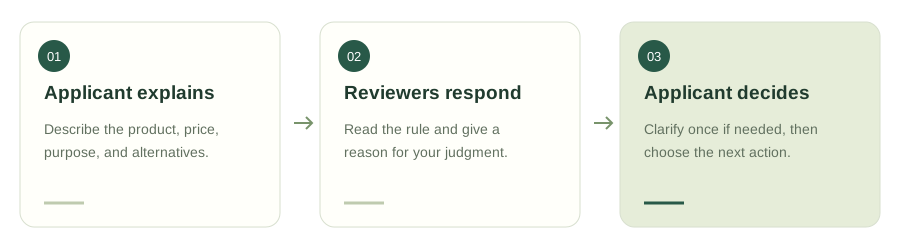
- Applicant explainsDescribe the product, price, purpose, and alternatives.
- Reviewers respondRead the rule and give a reason for your judgment.
- Applicant decidesClarify once if needed, then choose the next action.
As reviewer, answer the actual question
If someone asks whether they need a printer, praising its appearance does not resolve the question. Support the purchase with a relevant use case, or explain an unmet condition and a practical alternative.
For a group discussion, read the approval rule and current status shown for that request. One person's response may not settle a multi-person decision. Keep disagreement about the proposal, not the person's character.
As applicant again, use the new information
If reviewers ask about consumables, use your one supplement to explain cartridge availability or what you still need to check. Gather the important clarification before sending it; this is not an unlimited chat thread.
Then choose whether to buy, research further, or pass. Flowers can acknowledge helpful participation. An approval is a game response, not payment authorization, and a rejection does not control your real-world purchase.
Before you submit
Tick these prompts as you think. Your choices stay on this page and are not saved or sent.
Two ways to look at the same purchase
A reason to support it
Frequent use and accessible consumables would support it.
A reason to reconsider
Check printing frequency and cartridges, not just the machine price.
The example applicant records actual printing needs before choosing a model.
Questions you might have
Where can I send a request?
Choose a group or the public square using the options shown in the app.
Must I agree with other reviewers?
No. Give your own reasoned response while respecting the request's displayed rules.
Do I need an account to participate?
Yes: Google sign-in or a verified email account. Public content can be browsed first.